
For those seeking federal grant funding, Grants.gov serves as the central platform where all federal agencies post their discretionary grant opportunities and where applications are submitted. Registration is a necessary step to access and apply for grants, ensuring that individuals and organizations can efficiently manage their grant-seeking efforts. Fortunately, the process is straightforward and free of charge. Plus, Grants.gov is building a new, more user-friendly experience at simpler.grants.gov, making it even easier to identify funding opportunities. For now, the two are still separate websites. Searches for funding opportunities now use the new simpler.grants.gov search, but you’ll still register, sign in, and submit most applications on Grants.gov. Some screens may look different from the screenshots below as this transition continues.
Let’s walk through the registration process together!
NOTE: Before applying for federal grants at Grants.gov, System for Award Management (SAM) registration is required. If your organization is planning to apply for any type of federal grant, it is very important to complete the free SAM registration well in advance of the application deadline and make sure to renew it every year before the annual sam.gov renewal deadline. Luckily, we've put together a handy SAM registration how-to guide to make it easy.
NOTE: You will also need a free Login.gov account. Grants.gov asks you to sign in with Login.gov (or create a Login.gov account) as part of registration, so it can help to set one up at login.gov before you start.
Why Register for Grants.gov?
Grants.gov is the go-to portal for federal grant applications. Whether you’re an individual applying for funding or representing an organization, you must have an account to submit applications, track opportunities, and manage your grant-seeking journey. Without it, you can’t apply for the funding opportunities you need!
Registering for Grants.gov also allows you to:
- Stay informed – Get alerts on new grant opportunities and updates.
- Streamline the process – Submit and track applications in one place.
- Customize access – Manage multiple profiles for different organizations or roles.
So, let’s get you signed up!
How to Register for a Grants.gov Account
Follow these steps to create your Grants.gov account and get one step closer to securing funding:
Step 1: Start the Registration Process
- Head over to Grants.gov.
- Click Register in the top-right corner.
- On the Register page, hit Get Registered Now.
Step 2: Enter Your Contact Information & Create Login Credentials
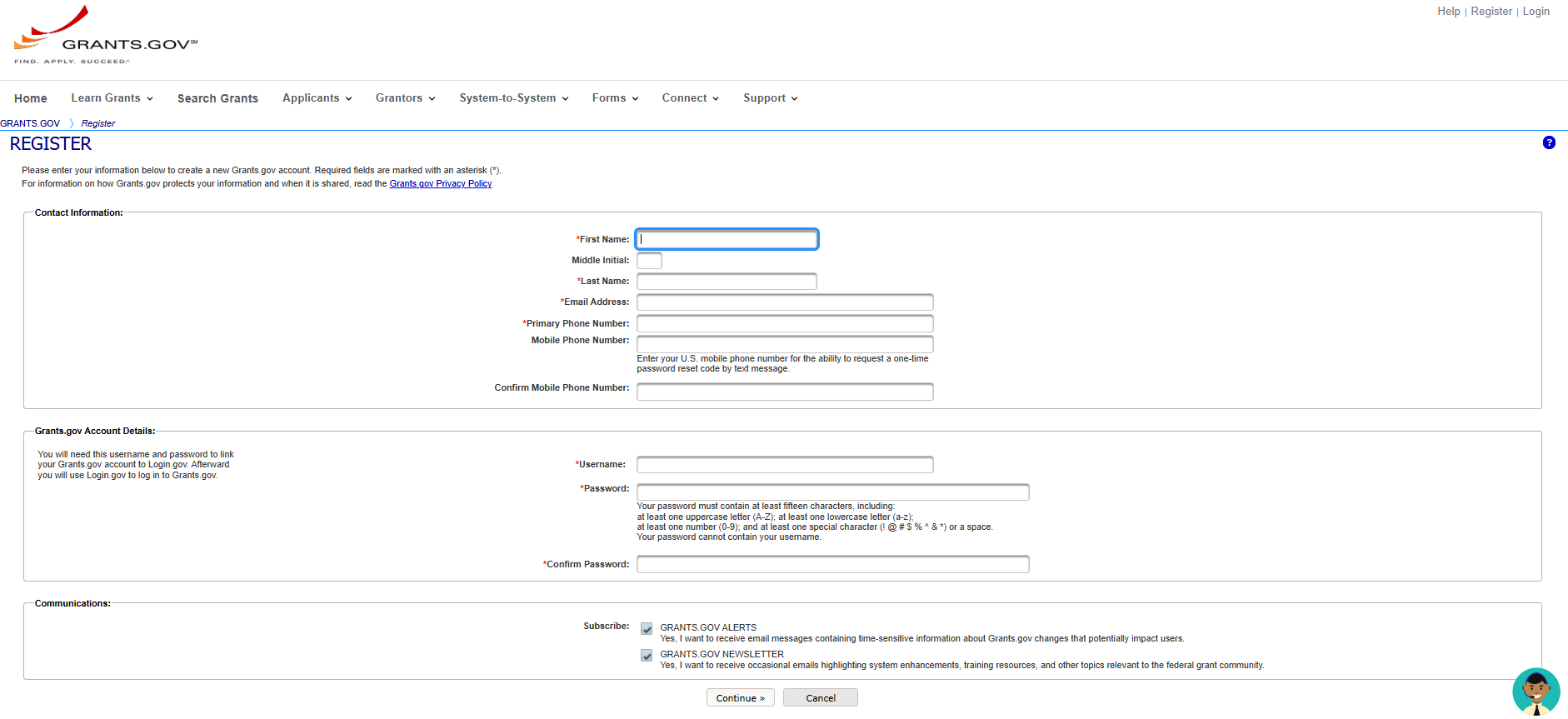
Fill in the required fields (marked with a red asterisk *), including:
- Email Address – All Grants.gov notifications will be sent here.
- Primary Phone Number – Required. Adding a mobile number is optional but helpful for password recovery.
- Username – Pick something memorable. It must be unique and follow specific character rules (only letters, numbers, and the characters ? . - _ @ are allowed; no spaces or all numbers; and a 12-character username must include one of those special characters or the letter “I” or “O” so it doesn’t look like a UEI).
- Password – Must be at least 15 characters, cannot contain your username or match your last six passwords, and include:
- One uppercase letter (A-Z)
- One lowercase letter (a-z)
- One number (0-9)
- One special character (!@#$%^&*) or a space
Step 3: Verify Your Email
- Choose whether to subscribe to Grants.gov alerts and newsletters (we recommend it!).
- Click Continue.
- Click Send Temporary Code – You’ll receive a one-time code in your email.
- Enter the code in the Temporary Code field and click Continue.
- When prompted, sign in with your Login.gov account (or create one) to link it to your Grants.gov account.
Step 4: Choose Your Profile Type
Now it’s time to set up your profile, which determines how you interact with Grants.gov.
- Applicants (People applying for grants): Select either Organization Applicant (applying on behalf of an organization) or Individual Applicant (applying as yourself).
- If you choose Organization Applicant, enter your organization’s UEI from SAM.gov, a profile name (usually your organization’s name), and your job title, then click Save and Login.
- If you are your organization’s E-Biz Point of Contact (E-Biz POC) in SAM.gov: Register with the same email address you used in SAM.gov. Grants.gov will automatically give you the Expanded AOR role, which lets you submit applications and assign roles to others in your organization.
- If you are anyone else (staff member, grant writer, or consultant): Register with your own email address. After you save your profile, Grants.gov emails your organization’s E-Biz POC and anyone with the Expanded AOR role, and one of them must assign you a role before you can work on or submit applications. For example, a Workspace Manager can create and work on applications, and a Standard AOR can also submit them. Contact your E-Biz POC early so role approval doesn’t hold you up near a deadline. If your E-Biz POC hasn’t registered with Grants.gov yet, ask them to do that first. You can see your assigned roles in the My Applicant Profile(s) table under My Account.
That’s it! Once your profile is saved, you’re registered with Grants.gov and ready to find funding. You can apply as soon as you have a role that lets you work on applications.
Managing Your Grants.gov Account
Once registered, you can use the My Account section to:
- Add and manage multiple profiles (if you work with different organizations).
- Update your email, password, or other account info.
- Access grant applications and track submissions.
Final Thoughts
Registering for Grants.gov is your first step toward unlocking federal funding opportunities. While the process requires a little time upfront, it’s well worth it.
So go ahead, get registered, and start exploring the funding that could make a big difference for you or your organization!
Need help with registration? Visit Grants.gov Online Help: Register with Grants.gov for additional resources. You can also reach Grants.gov Applicant Support 24/7 at 1-800-518-4726 or support@grants.gov.
Need help getting grant-ready or writing a proposal? Talk to one of our experts, it’s free!
Follow the Grants.gov Community Blog
The Grants.gov Community Blog is the official blog of Grants.gov, with news, tips, and training for federal grant applicants and grant-making agencies. Its “How to…” series is a great next step after registering, and it includes a step-by-step post on creating a Grants.gov account and linking it to Login.gov. You can also sign up to get new posts by email. Visit the blog.